

You reach out to a developer to build a custom application, and the first thing they ask is: "Can you send me your requirements document?" If you've never written one, that can feel a bit daunting. Where do you start? How detailed should it be?
A vague requirements document gets you a vague quote. And a vague quote is a project that runs over budget, over deadline, or both at once. On the other hand, a well-structured document lets you compare vendors on the same terms and stay in control of what gets delivered.
Here's a walkthrough of the eight sections that make up a solid requirements document, with a copy-paste template at the end.
What is a requirements document for?
A requirements document (sometimes called a project brief or spec) first aligns everyone's vision. When several people are involved (founder, project manager, operations lead), each one has their own idea of what the application should do. The document puts things in writing, and if it isn't written down, nobody will remember it. That prevents the "but I thought..." conversations three months down the road.
It also makes quotes comparable. If you're reaching out to multiple vendors, a shared document gives them the same frame to respond to. Without it, you're comparing apples and oranges: one quotes a wide scope, another quotes a narrow one, and the numbers become meaningless.
And it's a reference during development. "Was this feature part of the scope?" Open the requirements document, check, and settle it. That simple.
The document is ideally written after a project scoping phase that clarifies needs upfront. But even if you're starting from scratch, a structured document beats nothing.
The 8 sections of a good requirements document
A complete requirements document covers eight areas. Here's the overview before diving into details:
| # | Section | Content | Why it matters |
|---|---|---|---|
| 1 | Project overview | Context, company, problem to solve | The vendor understands the "why" |
| 2 | Goals and metrics | Expected results and KPIs | You know what success looks like |
| 3 | Target users | User profiles, roles, volumes | The application is designed for the right people |
| 4 | Functional scope | Features listed and prioritized | The quote is based on a clear scope |
| 5 | Technical constraints | Hosting, integrations, security | No nasty surprises mid-project |
| 6 | Design and UX | Brand guidelines, visual references | The interface matches your expectations |
| 7 | Timeline and milestones | Key dates, project phases | Deadlines are realistic and shared |
| 8 | Budget | Budget range or envelope | The vendor proposes a fitting solution |
1. Project overview
This is the context-setting section. The vendor needs to understand who you are, what your company does, and why you need this application. A couple of paragraphs will do.
An example. A mid-sized logistics company manages its delivery schedules with shared Excel spreadsheets across three offices. The files go out of sync, drivers get conflicting instructions, and customer service spends its time checking statuses over the phone. The goal: replace those spreadsheets with a web application that centralizes planning.
That kind of description gives the vendor the business context they need. They get the problem, they get the environment, they can start thinking.
Also mention what you currently use: what tools are in place today? What works, what doesn't anymore? This information shapes everything that follows.
2. Goals and success metrics
A goal without a measurable indicator is wishful thinking. "Improve productivity" doesn't mean much. "Cut order processing time by 40%" can actually be verified.
Pair each goal with a specific metric:
| Goal | Metric | Target |
|---|---|---|
| Reduce scheduling errors | Incidents per week | From 12 down to under 3 |
| Speed up order processing | Average processing time | From 45 min down to 15 min |
| Improve customer satisfaction | NPS score | Reach 50+ |
| Centralize data | Number of data sources | From 5 spreadsheets to 1 application |
These metrics also come in handy after launch to check whether the project actually delivered on its promises. Without them, you have no way to tell whether it was worth doing at all.
3. Target users
Who will use the application? The answer changes everything. A tool for accountants on large screens isn't designed the same way as an app for field technicians on smartphones.
For each user profile, specify:
- Roles: administrator, manager, standard user, external client...
- Volume: how many simultaneous users? 10, 100, 10,000?
- Technical level: people used to complex interfaces, or users still getting comfortable with digital tools?
- Usage context: at a desk on a fixed workstation, on the go with a phone, in a warehouse wearing gloves?
A vendor who understands your users well will make better interface decisions.
4. Functional scope
This is the densest section in the document. Here, you list what the application must actually do.
For each module, detail the features and assign a priority level. The MoSCoW method works well for this: each feature is classified as Must Have (non-negotiable), Should Have (important but not blocking), Could Have (if budget allows), or Won't Have (explicitly excluded).
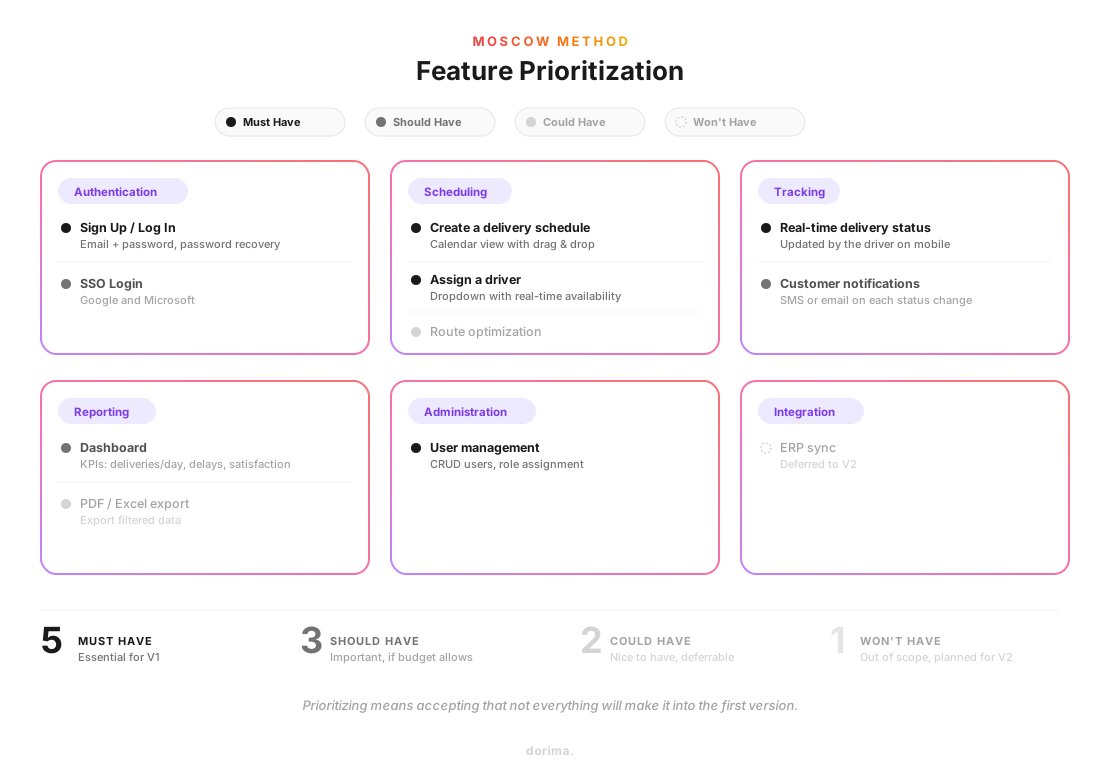
| Module | Feature | Priority | Details |
|---|---|---|---|
| Authentication | Sign up / Log in | Must Have | Email + password, password recovery |
| Authentication | SSO login | Should Have | Google and Microsoft |
| Scheduling | Create a delivery schedule | Must Have | Calendar view with drag & drop |
| Scheduling | Assign a driver | Must Have | Dropdown with availability |
| Scheduling | Optimize routes | Could Have | Automatic route suggestion |
| Tracking | Real-time delivery status | Must Have | Updated by driver on mobile |
| Tracking | Customer notifications | Should Have | SMS or email on each status change |
| Reporting | Dashboard | Should Have | KPIs: deliveries/day, delays, satisfaction |
| Reporting | PDF/Excel export | Could Have | Export filtered data |
| Administration | User management | Must Have | CRUD users, assign roles |
| Integration | Sync with existing ERP | Won't Have | Postponed to V2 |
Prioritizing means accepting that not everything will make it into the first version. The point is to deliver a working MVP, then iterate.
Be specific in your descriptions. "User management" can mean a lot of things. "Create, edit, deactivate a user account and assign a role among admin, manager, and driver" is far more useful for a quote.
Got a web application project in mind?
5. Technical constraints
Even if you're not a developer, some technical constraints are your responsibility. The vendor needs to know about them from the start to avoid bad surprises mid-project.
- Hosting: any specific requirements? Must it be hosted in a particular country for data compliance? Cloud or dedicated server?
- Integrations: does the application need to connect to an ERP, a CRM, a payment gateway, a third-party API?
- Browsers and devices: which browsers to support? Does the application need to work on mobile?
- Performance: expectations on load times or number of simultaneous users?
- Security: sensitive data to protect? Certifications to comply with (ISO 27001, SOC 2, HIPAA)?
If you want to understand the technical options, the article on choosing a development language can help. Otherwise, let the vendor make their recommendation.
6. Design and UX
Design will be worked out in detail during the prototyping phase. But the requirements document should lay the groundwork:
- Brand guidelines: do you have colors, typography, a logo to follow?
- Visual references: are there applications whose interface you like? Share screenshots or links.
- Responsive: should the application adapt to mobile and tablet, or desktop only?
- Accessibility: any WCAG or ADA requirements?
Even a few hand-drawn wireframes help the vendor understand what you have in mind. They don't need to look good, they need to be readable.
7. Timeline and milestones
List the dates that matter to you. A realistic timeline helps the vendor organize their work and spot delay risks early.
Milestones you'll find in most web projects:
- Scoping and specifications: finalize the detailed scope
- Mockups and prototype: validate the interface before development
- Development: iterative sprints with intermediate demos
- QA: testing and bug fixes before going live
- Go-live: launch the application
- Warranty: post-launch bug-fixing period
If you have a hard deadline (a trade show, a commercial launch, a regulatory obligation), say so. It conditions everything else.
8. Budget
The budget question often makes people uncomfortable. Many project owners prefer not to share a number, afraid the vendor will "inflate" the quote to match the envelope. In practice, the opposite happens.
A vendor who doesn't know your budget will either aim too high (and you waste time) or propose a bare-bones solution that doesn't match your expectations. Sharing a range, even a wide one, steers the proposal toward something realistic.
You don't need to give an exact number. A range like "$30,000 to $50,000" is enough to frame the conversation. The vendor can then propose a first version at the low end, with options to go further.
Also specify your preferred pricing model: fixed price, time & materials, or a mix of both. And whether the budget covers maintenance and hosting, or just the initial development.
Ready-to-use requirements document template
Here's a template to copy-paste and adapt. Replace the examples in brackets with your own information.
# Requirements document — [Project name]

## 1. Project overview

**Company**: [Name, industry, size]
**Context**: [Describe the current situation and the problem to solve]
**Existing tools**: [Tools currently in use, what works and what doesn't]
**Vision**: [In one sentence, what does success look like for this project?]

## 2. Goals and success metrics

| Goal | Metric | Target |
|------|--------|--------|
| [Goal 1] | [Measurable KPI] | [Target value] |
| [Goal 2] | [Measurable KPI] | [Target value] |
| [Goal 3] | [Measurable KPI] | [Target value] |

## 3. Users

| Role | Description | Estimated volume | Technical level |
|------|-------------|------------------|-----------------|
| [Admin] | [Manages settings and users] | [2-3] | [High] |
| [User] | [Uses the application daily] | [50-100] | [Medium] |
| [Client] | [Accesses their personal space] | [500+] | [Low] |

**Usage context**: [Desktop / Mobile / Field / Mixed]

## 4. Features

| Module | Feature | Priority | Details |
|--------|---------|----------|---------|
| [Module 1] | [Feature] | Must Have | [Precise description] |
| [Module 1] | [Feature] | Should Have | [Precise description] |
| [Module 2] | [Feature] | Must Have | [Precise description] |
| [Module 2] | [Feature] | Could Have | [Precise description] |
| [Module 3] | [Feature] | Won't Have | [Reason for exclusion] |

**MoSCoW priorities**:
- **Must Have**: non-negotiable for V1
- **Should Have**: important, planned if budget allows
- **Could Have**: nice to have, can be deferred
- **Won't Have**: excluded from this project

## 5. Technical constraints

- **Hosting**: [Cloud / Dedicated server / Country-specific / Other]
- **Integrations**: [ERP, CRM, third-party APIs to connect]
- **Browsers**: [Chrome, Firefox, Safari, Edge — minimum versions]
- **Mobile**: [Responsive required / Native app / PWA]
- **Performance**: [Max load time, simultaneous users]
- **Security**: [GDPR, certifications, sensitive data]
- **Tech stack**: [Preference or constraint, or "at the vendor's discretion"]

## 6. Design and UX

- **Brand guidelines**: [Link to brand book or attached files]
- **Visual references**: [URLs or screenshots of interfaces you like]
- **Responsive**: [Yes / No — which devices]
- **Accessibility**: [WCAG AA / ADA / No specific requirement]
- **Wireframes**: [Attached / To be created by the vendor]

## 7. Timeline

| Milestone | Target date |
|-----------|-------------|
| Vendor responses | [Date] |
| Vendor selection | [Date] |
| Scoping and specifications | [Date] |
| Mockups and prototype | [Date] |
| Development | [Start — End] |
| QA | [Date] |
| Go-live | [Date] |

**Hard deadline**: [Date and reason, or "flexible"]

## 8. Budget

- **Range**: [Budget range]
- **Model**: [Fixed price / Time & materials / Mixed]
- **Includes**: [Development only / Maintenance included / Hosting included]
- **Billing**: [Preferred terms: deposit, milestones, monthly]
This template isn't rigid. Add sections if your project calls for them, remove those that don't apply.
One tip: start with the sections you know best (overview, goals, users). The more technical sections can be filled in with your team or during an initial conversation with the vendor.
Mistakes that sink a requirements document
Staying too vague
"The interface should be intuitive." This line shows up in almost every requirements document, and it means nothing. Intuitive for whom? In what context? With what skill level?
Replace empty adjectives with observable behaviors. Instead of "intuitive," write: "A new user should be able to create their first order in under 3 minutes, without assistance." That's something a vendor can actually work with.
Describing the solution instead of the problem
"There needs to be a green button in the top right corner that opens a dropdown menu with three options." This kind of description prescribes a technical solution without explaining the need. The vendor has zero room to propose something better.
Describe the problem instead: "The user needs to switch quickly between active orders, archived orders, and drafts." The vendor might find a better approach than your dropdown: tabs, a filter bar, a sidebar.
Forgetting about users
A requirements document that never mentions end users describes an application for nobody. Who's going to use it, and in what context? Without this information, the vendor designs in a vacuum.
Not prioritizing
When everything is a priority, nothing is. If your feature list doesn't distinguish what's essential from what's nice-to-have, the vendor has to quote everything as mandatory. The budget balloons, and so do the timelines.
Use the MoSCoW method or something similar. Rank each feature, and accept that some things will wait for V2.
What happens after the requirements document?
Once the document is written, here's what comes next:
- Send it to two or three vendors to get comparable proposals.
- Compare responses on scope, timeline, budget, and technical approach.
- The selected vendor takes the document and turns it into technical specifications during a project scoping phase.
- Mockups and the prototype validate the interface before a single line of code is written.
- Development starts, with regular deliveries and feedback at each step.
The article on creating custom software covers this entire process if you want to go further.
A requirements document doesn't need to be perfect. It needs to be precise enough that two people reading it understand the same thing. If that's the case, you've done the hard part. And if you want a second pair of eyes before sending it out, let's talk.