Spreadsheet
Shared spreadsheets
Work together on the same data, without risk of overwriting or outdated versions.
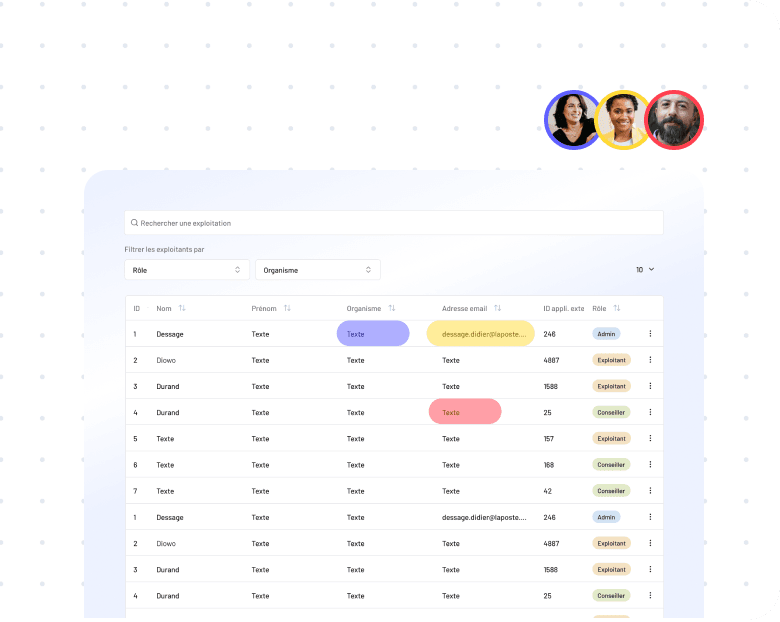


Your Excel files have become critical but unmanageable? We transform them into collaborative and secure web applications. Your business logic and data are preserved, plus: multi-user, history, access rights and no more re-keying.
Analyze my Excel file








Your Excel file has grown with your company. It has become essential, but also unmanageable: multiple versions, file conflicts, broken formulas, poor performance. And yet, it contains all your business logic.
We transform your critical Excel files into modern web applications. Your teams get a familiar interface, but with the power of a real application: real-time collaboration, access rights, modification history, automations.
The migration is smooth: we preserve your data, formulas and business rules. You continue working during the transition, and your teams are trained to use the new tool.
Replacing Excel with a collaborative application is not just a technical topic: it's an opportunity to revisit processes that picked up bad habits over the years. We start from a specification document that captures every business rule, then move to software built to last, not patched together for a few months.
Our fully remote team works with companies across France, from family-run SMEs to industrial groups. We work remotely on the build and come on site for modelling workshops when it helps, with a weekly checkpoint to track progress.
Work together on the same data, without risk of overwriting or outdated versions.
Keep your formulas and automate your processes without complexity.
Generate reports, invoices or statements instantly from your web data.

Create simple interfaces for data entry and collection, with real-time validation and control.

An order management application with real-time tracking, low stock alerts and marketplace synchronization.
A centralized platform with training catalog, online registration, attendance tracking and automatic certificate generation.
Quote/invoicing software with item library, automatic calculations, PDF generation and accounting export.
A member database with member portal, online subscription payment, integrated emailing and statistics.
Concrete projects Dorima delivered on this service.
Critical formulas and VBA macros are mapped before we write a single line of code.
Every calculation rule carried over from the spreadsheet is checked by tests before going live.
Tables, filters and exports keep Excel's conventions so your teams relearn nothing.
Your teams keep working in the existing file throughout the transition.
Each user only reaches the data in their scope, and every change stays traceable.
A relational schema your internal teams can pick up, even if you switch vendors.
The application handles several thousand records where the spreadsheet had started to crawl.
A progress call every week, plus on-site workshops when they actually help.
Concrete custom development achievements

Identify levers to strengthen farm autonomy

An extranet to centralize all information and documentary resources

Offer a mortgage simulation that matches real lending conditions
Provide tools to master energy consumption
Carry out genomic sequencing projects
Identify levers to strengthen farm autonomy
An extranet to centralize all information and documentary resources
Offer a mortgage simulation that matches real lending conditions
Provide tools to master energy consumption
Carry out genomic sequencing projects
Identify levers to strengthen farm autonomy
An extranet to centralize all information and documentary resources
Offer a mortgage simulation that matches real lending conditions
Provide tools to master energy consumption
Carry out genomic sequencing projects
We analyze your files in detail: data structure, critical formulas, VBA macros, links between sheets. We identify what needs to be preserved and what can be improved. This audit feeds directly into the project scoping and avoids nasty surprises during development.
We design an optimized data structure that faithfully reproduces your business logic. Relationships between data are explicit and calculations are verified by tests. The outcome is documented in a relational schema that your internal teams can pick up, even if you switch vendors later.
Your users won't be lost: we create interfaces that follow Excel conventions (tables, filters, exports) while adding the features of a real web application. A prototyping step lets us validate key screens with your users before kicking off development.
For a focused tool replacing a critical Excel file (stock management, customer tracking, reporting), expect €15k–€35k. A broader platform with several modules and ERP/CRM integrations sits between €50k and €120k. Upfront scoping lets us adjust the scope to the available budget without cutting what really matters.
For a first version in production, expect 2 to 4 months depending on the complexity of the source file. We first ship an MVP that covers the core business in 6 to 8 weeks so users can start working with it. Secondary modules are added afterwards, at the pace of real feedback.
Airtable and Google Sheets are great for roughing out an idea or handling a few dozen rows. As soon as you move to several thousand records, fine-grained access rights, complex business rules or integration with your IS, they hit their limits. A custom collaborative application has no technical ceiling and belongs fully to you.
An Excel file shared between multiple users is guaranteed chaos: conflicting versions, overwritten data, lost history. A web application solves all these problems.
Your data is centralized, secured and accessible everywhere. Each user has the rights that correspond to their role. Every modification is tracked and can be undone.
And you keep what makes Excel powerful: tables, filters, exports. Your teams find their bearings instantly.
What our clients gain by migrating their Excel:
We support your business software projects from start to finish.